Ameerpet Hyderabad

Call Now : 9390612347

Dilsukhnagar Hyderabad

Call Now : 8096061003

Mehdipatnam Hyderabad

Call Now : 9000709021

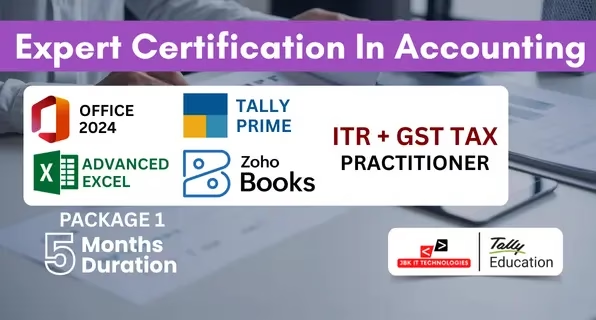
Expert Certification in Accounting

Package 1 5 Months Duration

The Expert Certification in Accounting – Package 1 (5 Months) is a structured professional accounting program designed to provide complete practical training in office tools, computerized accounting, cloud accounting, taxation, and financial reporting.

4.9⭐

Student Rating

5000+

Students

100%

Placement Assistance

ISO

Certified

Book Your FREE Demo Class

Expert Certification in Accounting –Package 1 5 Months Duration

The Expert Certification in Accounting – Package 1 (5 Months) is a structured professional accounting program designed to provide complete practical training in office tools, computerized accounting, cloud accounting, taxation, and financial reporting. The course is aligned with current industry requirements and focuses on developing job-oriented accounting skills. This program includes training on MS Office 2024Advanced ExcelTally Prime with GST, Zoho Books, and ITR & GST Tax Practice. The curriculum is designed to take learners from basic office operations to practical business accounting and statutory compliance. Students receive hands-on training using real business scenarios. The course includes practical work on transaction entry, GST billing, bank reconciliation, balance sheet finalization, MIS report preparation, online GST returns, and income tax filing procedures. Training is based on real accounting workflows followed by companies and CA firms. The program is suitable for both commerce and non-commerce graduates. Learners with no prior accounting background can start comfortably as the course begins with fundamentals and gradually moves to professional-level accounting and taxation concepts.
Expert Certification In Accounting (3)

Course Curriculum – Package 2 (6 Months)

Introduction to MS Office
  • Overview of Microsoft Office suite and its applications.
  • Understanding the user interface and common features.
  • Creating, formatting, and editing documents.
  • Working with text, paragraphs, and styles.
  • Inserting and formatting images, tables, and graphics.
  • Using templates and mail merge for document automation.
  • Creating, formatting, and managing worksheets and workbooks.
  • Working with formulas, functions, and calculations.
  • Data analysis techniques including sorting, filtering, and pivot tables.
  • Chart creation and visualization of data.
  • Creating and formatting slideshows and presentations.
  • Adding text, images, shapes, and multimedia elements.
  • Applying themes, layouts, and transitions for visual appeal.
  • Delivering presentations effectively.
  • Introduction to databases and database management systems.
  • Creating and designing databases, tables, and relationships.
  • Querying and filtering data using SQL and query design.
  • Creating forms, reports, and macros for database automation.
  • Integrating data and content between MS Office applications.
  • Collaborative editing and sharing of documents using OneDrive or SharePoint.
  • Co-authoring documents in real-time with colleagues.
  • Advanced formatting and automation techniques in Word, Excel, and PowerPoint.
  • Using advanced functions and analysis tools in Excel.
  • Database optimization and performance tuning in Access.
  • Hands-on practice with real-world scenarios and projects.
  • Developing skills through practical application of learned concepts.
Excel Basics Refresher
  • Introduction to Excel interface & navigation
  • Workbook & worksheet management
  • Basic formulas and cell referencing
  • Sorting & Filtering data
  • Logical Functions: IF, AND, OR, IFERROR, IFS
  • Lookup Functions: VLOOKUP, HLOOKUP, INDEX, MATCH, XLOOKUP
  • Text Functions: LEFT, RIGHT, MID, LEN, TRIM, CONCATENATE, TEXTJOIN
  • Date & Time Functions: TODAY, NOW, DATEDIF, NETWORKDAYS
  • Math & Statistical Functions: SUMIFS, COUNTIFS, AVERAGEIFS, ROUND, RANK, SUBTOTAL
  • Creating dropdown lists
  • Applying custom validation rules
  • Highlighting duplicate values
  • Using formulas in conditional formatting
  • Sorting & advanced filtering
  • Using Tables and Structured References
  • Working with slicers
  • Using Remove Duplicates & Text to Columns
  • Creating & customizing Pivot Tables
  • Grouping, filtering & summarizing data
  • Creating interactive Pivot Charts
  • Using slicers and timelines
  • Designing dynamic dashboards
  • Using charts (bar, line, combo, pie, etc.)
  • Using sparklines, gauges & KPI indicators
  • Creating dashboard layout with form controls
  • Scenario Manager
  • Goal Seek
  • Data Tables
  • Solver Tool for optimization
  • Introduction to Macros & VBA
  • Recording and editing macros
  • Assigning macros to buttons
  • Basic VBA scripting concepts
Introduction to Tally Prime
  • Overview of Tally Prime
  • Navigating the Tally Prime Interface
  • Understanding Key Functionalities and Features
  • Advanced Accounting Setup: Configuring Ledgers, Groups, and Cost Centers
  • Advanced Inventory setup: Stock Groups, Categories, and Items: Advanced Setup and Configurations
  • Managing Foreign Exchange Transactions: Currency Management and Forex Rates
  • Vouchers in Detail: Recording complex transactions using Payment, Receipt, Journal, Contra, and more
  • Bill of Materials (BoM): Creation and Management of Complex Bills of Materials
  • Multiple Stock Locations: Managing Multiple Godowns/Stores in Tally Prime
  • Stock Transfers and Adjustments: Handling Stock In Transit, Stock Adjustments, and Stock Valuation Reports
  • Inventory Valuation: FIFO, LIFO, and Average Cost Method
  • Financial Statements: Profit & Loss, Balance Sheet, and Cash Flow
  • Ratio Analysis: Calculating and Interpreting Financial Ratios
  • Budgets and Controls: Creating and Monitoring Budgets
  • Audit and Reconciliation:
  • Bank Reconciliation
  • Cash Flow and Bank Audit
  • Reconciliation of GST Returns
  • Employee Setup and Payroll Configurations
  • Salary Structures: Designing Complex Salary Structures and Pay Components
  • Statutory Compliances: PF, ESI, and Professional Tax Management
  • Generate Payroll Reports: Salary Slips, Pay Register, and Form 16
  • Leave Management: Tracking and Managing Employee Leave
  • Taxation Handling:
  • GST Computation and Returns
  • Tally GST Reports (GSTR-1, GSTR-3B, GSTR-9)
  • TDS and TCS Management
  • GST and TDS Reconciliation
  • Advanced GST Configuration: Tax Categories, HSN/SAC Codes, and Reverse Charge Mechanism
  • GST Auditing and Filing: Generating GST Audit Reports
  • GST on E-Commerce Transactions: Handling GST for E-Commerce Sellers and Buyers
  • TDS & TCS Advanced Configurations: Handling Different TDS/TCS Rates, Reporting, and Filing
  • Customizing Tax Reports and Returns
  • Customizing Reports: Creating and Modifying Reports (Financial, Inventory, etc.)
  • Tally Prime Dashboard: Setting up and Analyzing Custom Dashboards
  • Data Exporting and Importing: Exporting Reports to Excel, PDF, and XML formats
  • Multi-Company Reporting: Consolidating Financial Data Across Multiple Companies
  • Advanced Financial Reports: Cash Flow, Receivables/Payables, and Trial Balance
  • Data Backup and Restoration: Techniques for Backup, Restoring, and Data Integrity
  • Managing Multiple Users and Roles: Configuring User Permissions and Rights
  • Import and Export Data: Bulk Importing/Exporting Data using Tally
  •  
  • Creating Custom Invoices and Vouchers: Designing Templates for Vouchers and Invoices
  • Cost Centers and Cost Categories: Advanced Management for Cost Control
  • Consolidation of Multiple Companies: Inter-Company Transactions and Consolidated Reports
  • Handling Complex Transactions: Advanced Transactions and Entry Configuration
Introduction to Zoho Books
  • Overview of Zoho ecosystem
  • Importance of cloud-based accounting
  • Dashboard and navigation
  • User roles & permissions
  • Creating a new organization
  • Configuring basic company settings
  • Currency, tax, time zone settings
  • Adding users and managing access
  • Understanding account types
  • Creating, editing, and managing ledgers
  • Opening balances setup
  • Adding customers and vendors
  • Managing contact details
  • Customer & vendor statements
  • Creating quotations & sales orders
  • Converting quotes to invoices
  • Recurring invoices setup
  • Payment collection & tracking
  • Credit notes
  • Creating purchase orders & bills
  • Recording expenses
  • Vendor payments
  • Managing recurring expenses
  • Connecting bank accounts
  • Fetching bank feeds
  • Bank reconciliation
  • Managing deposits, transfers, and withdrawals
  • GST configuration
  • Creating HSN/SAC codes
  • Applying taxes in transactions
  • GST reports generation
  • Filing GST returns through Zoho Books
  • Creating items & item groups
  • Stock adjustments
  • Inventory tracking
  • Low-stock alerts
ITR & GST Tax Practitioner
  • Income Tax Basics
  • PAN & Compliance
  • ITR Filing (Individual & Business)
  • GST Registration
  • GSTR Filing
  • Input Tax Credit (ITC)
  • Live Practical Tax Filing
  • Real Client Case Studies

Why Choose JBK IT Technologies?

Experience industry-focused training designed to prepare you for certifications, interviews, and successful careers through practical learning and expert mentorship.

ISO Certified Institute

Gain trusted certifications that add credibility to your professional profile.

Industry Expert Trainers

Learn directly from professionals with real-world project experience.

Live Projects

Build practical experience through assignments based on actual business scenarios.

Placement Assistance

Get support with resumes, interview preparation, and career opportunities.

Mock Interviews

Practice with industry-style interviews to improve confidence and communication.

Companies Where Our Students Are Working

Placed Students From JBK IT Technologies

Testimonial

What They Say About Us

Frequently Asked Questions

1. Do I need a commerce background?

No, beginners from any background can join.

Yes, it is designed for direct job placement.

Yes, full placement assistance is provided.

Yes, you will receive course completion certificates.

Enquiry Form