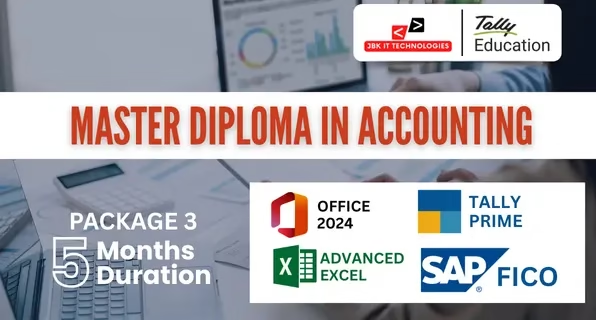
Master Diploma in Accounting – Package 3 (5 Months)

Our Hiring Partners

Course Overview – Master Diploma in Accounting – Package 3 (5 Months)

The Master Diploma in Accounting – Package 3 (5 Months) is a professional accounting training program designed to build practical skills in office operations, spreadsheet-based financial work, computerized accounting, and ERP-based finance management. This package is structured for candidates who require both traditional accounting knowledge and corporate-level ERP exposure. The program begins with training in office tools for documentation, reporting, and basic data handling. Advanced Excel is used for financial calculations, MIS preparation, and data analysis for business reporting. Computerized accounting training using Tally Prime covers real-time business transactions, taxation basics, inventory handling, banking operations, and final accounts preparation including Profit & Loss Account and Balance Sheet. The ERP finance module using SAP FICO introduces corporate accounting processes such as financial reporting structure, general ledger management, cost control, accounts payable and receivable, and basic organizational configuration used in large companies. The program is fully based on practical software usage and standard accounting workflows followed in corporate and commercial environments. After completion, learners gain working knowledge of office-based accounting, computerized accounting systems, and ERP finance operations.
Course Modules – Package 3 (5 Months)

Module 1: MS Office 2024
  • Overview of Microsoft Office suite and its applications.
  • Understanding the user interface and common features.
  • Creating, formatting, and editing documents.
  • Working with text, paragraphs, and styles.
  • Inserting and formatting images, tables, and graphics.
  • Using templates and mail merge for document automation.
  • Creating, formatting, and managing worksheets and workbooks.
  • Working with formulas, functions, and calculations.
  • Data analysis techniques including sorting, filtering, and pivot tables.
  • Chart creation and visualization of data.
  • Creating and formatting slideshows and presentations.
  • Adding text, images, shapes, and multimedia elements.
  • Applying themes, layouts, and transitions for visual appeal.
  • Delivering presentations effectively.
  • Introduction to databases and database management systems.
  • Creating and designing databases, tables, and relationships.
  • Querying and filtering data using SQL and query design.
  • Creating forms, reports, and macros for database automation.
  • Integrating data and content between MS Office applications.
  • Collaborative editing and sharing of documents using OneDrive or SharePoint.
  • Co-authoring documents in real-time with colleagues.
  • Advanced formatting and automation techniques in Word, Excel, and PowerPoint.
  • Using advanced functions and analysis tools in Excel.
  • Database optimization and performance tuning in Access.
  • Hands-on practice with real-world scenarios and projects.
  • Developing skills through practical application of learned concepts.
Module 2: Advanced Excel
  • Introduction to Excel interface & navigation

  • Workbook & worksheet management

  • Basic formulas and cell referencing

  • Sorting & Filtering data

  • Logical Functions: IF, AND, OR, IFERROR, IFS

  • Lookup Functions: VLOOKUP, HLOOKUP, INDEX, MATCH, XLOOKUP

  • Text Functions: LEFT, RIGHT, MID, LEN, TRIM, CONCATENATE, TEXTJOIN

  • Date & Time Functions: TODAY, NOW, DATEDIF, NETWORKDAYS

  • Math & Statistical Functions: SUMIFS, COUNTIFS, AVERAGEIFS, ROUND, RANK, SUBTOTAL

  • Creating dropdown lists

  • Applying custom validation rules

  • Highlighting duplicate values

  • Using formulas in conditional formatting

  • Sorting & advanced filtering

  • Using Tables and Structured References

  • Working with slicers

  • Using Remove Duplicates & Text to Columns

  • Creating & customizing Pivot Tables

  • Grouping, filtering & summarizing data

  • Creating interactive Pivot Charts

  • Using slicers and timelines

  • Designing dynamic dashboards

  • Using charts (bar, line, combo, pie, etc.)

  • Using sparklines, gauges & KPI indicators

  • Creating dashboard layout with form controls

  • Scenario Manager

  • Goal Seek

  • Data Tables

  • Solver Tool for optimization

  • Introduction to Macros & VBA
  • Recording and editing macros
  • Assigning macros to buttons
  • Basic VBA scripting concepts
Module 3: Tally Prime with GST
  • What is Accounting
  • Objectives of Accounting
  • Types of Accounts
  • Fundamental Accounting Equation
  • Double Entry System
  • Common Financial Statements
  • Overview of Tally Prime
  • Navigating the Tally Prime Interface
  • Understanding Key Functionalities and Features
  • Advanced Accounting Setup: Configuring Ledgers, Groups, and Cost Centers
  • Advanced Inventory setup: Stock Groups, Categories, and Items: Advanced Setup and Configurations
  • Managing Foreign Exchange Transactions: Currency Management and Forex Rates
  • Vouchers in Detail: Recording complex transactions using Payment, Receipt, Journal, Contra, and more
  • Bill of Materials (BoM): Creation and Management of Complex Bills of Materials
  • Multiple Stock Locations: Managing Multiple Godowns/Stores in Tally Prime
  • Stock Transfers and Adjustments: Handling Stock In Transit, Stock Adjustments, and Stock Valuation Reports
  • Inventory Valuation: FIFO, LIFO, and Average Cost Method
  • Financial Statements: Profit & Loss, Balance Sheet, and Cash Flow
  • Ratio Analysis: Calculating and Interpreting Financial Ratios
  • Budgets and Controls: Creating and Monitoring Budgets
  • Audit and Reconciliation:
  • Bank Reconciliation
  • Cash Flow and Bank Audit
  • Reconciliation of GST Returns
  • Employee Setup and Payroll Configurations
  • Salary Structures: Designing Complex Salary Structures and Pay Components
  • Statutory Compliances: PF, ESI, and Professional Tax Management
  • Generate Payroll Reports: Salary Slips, Pay Register, and Form 16
  • Leave Management: Tracking and Managing Employee Leave
  • Taxation Handling:
  • GST Computation and Returns
  • Tally GST Reports (GSTR-1, GSTR-3B, GSTR-9)
  • TDS and TCS Management
  • GST and TDS Reconciliation
  • Advanced GST Configuration: Tax Categories, HSN/SAC Codes, and Reverse Charge Mechanism
  • GST Auditing and Filing: Generating GST Audit Reports
  • GST on E-Commerce Transactions: Handling GST for E-Commerce Sellers and Buyers
  • TDS & TCS Advanced Configurations: Handling Different TDS/TCS Rates, Reporting, and Filing
  • Customizing Tax Reports and Returns
  • Customizing Reports: Creating and Modifying Reports (Financial, Inventory, etc.)
  • Tally Prime Dashboard: Setting up and Analyzing Custom Dashboards
  • Data Exporting and Importing: Exporting Reports to Excel, PDF, and XML formats
  • Multi-Company Reporting: Consolidating Financial Data Across Multiple Companies
  • Advanced Financial Reports: Cash Flow, Receivables/Payables, and Trial Balance
  • Data Backup and Restoration: Techniques for Backup, Restoring, and Data Integrity
  • Managing Multiple Users and Roles: Configuring User Permissions and Rights
  • Import and Export Data: Bulk Importing/Exporting Data using Tally
  •  
  • Creating Custom Invoices and Vouchers: Designing Templates for Vouchers and Invoices
  • Cost Centers and Cost Categories: Advanced Management for Cost Control
  • Consolidation of Multiple Companies: Inter-Company Transactions and Consolidated Reports
  • Handling Complex Transactions: Advanced Transactions and Entry Configuration
Module 4: SAP FICO (Financial Accounting & Controlling)
  • Overview of SAP and ERP systems

  • Navigation in SAP GUI

    • Organizational structure in SAP FI

    • General Ledger Accounting (G/L)

    • Accounts Payable (AP)

    • Accounts Receivable (AR)

    • Bank Accounting

    • Asset Accounting

    • Posting transactions and document types

  • Taxation and GST configuration in SAP

  • Payment processes and clearing

  • Month-end and year-end closing activities

  • Financial reporting and analysis

  • Bank reconciliation process
  • Introduction to Controlling and its role in SAP

  • Cost Element Accounting

  • Cost Center Accounting

  • Internal Orders

  • Product Costing

  • Profitability Analysis (CO-PA)

  • Budgeting and planning

  • Cost allocation and settlement

  • Integration of CO with other SAP modules

  • Hands-on exercises on SAP system

  • Real-time business scenarios and problem-solving

  • End-to-end case studies involving FI and CO integration

  • Resume building for SAP FICO roles

  • Mock interviews and common interview questions

  • Tips for certification exams and career growth

Who Can Join This Course?

Training Features

Untitled design (17)
ISO Certification

ISO Certified institute offering quality training and industry-recognized certification.

Untitled design (21)
Placement Assistance

100% placement support with interview preparation and resume building.

Untitled design (23)
Mock Interviews

Interview practice sessions to boost confidence and job readiness.

Untitled design (20)
Experienced Trainers

Industry experts with real-time project experience and teaching excellence.

Untitled design (22)
Real-Time Projects

Hands-on training with practical, business-oriented Excel assignments.

Untitled design (24)
Live Doubt Clearing

Interactive sessions for real-time query resolution and concept clarity.

Frequently Asked Questions

1. Do I need a commerce background?

No, beginners from any background can join.

Yes, it is designed for direct job placement.

Yes, full placement assistance is provided.

Yes, you will receive course completion certificates.

Enquiry Form